WARNING: This blog discuses change to file system permissions. Read and apply at your own risk!!!
I had issues with my OneDrive always stating it’s processing 457 changes. This same message was going on for weeks but I ignored it as I had other things to worry about first.
I finally got frustrated and started to play with settings, using my google-fu, resetting, etc.
What finally worked was resetting the permissions on my folders. Like other technical folks, I reimage or reset my PC often as I use it for testing or want a clean install few times a year. By doing so, obviously the NTFS permissions change as I get new local account with a new SID.
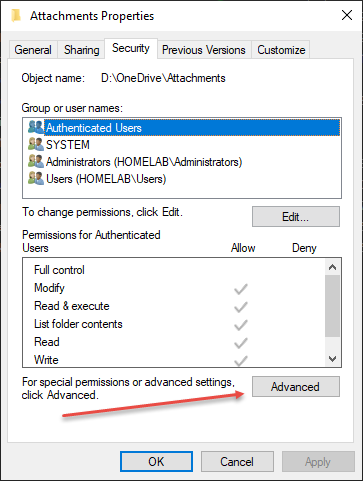
From the top root folder, go to Properties, select the Security tab, and choose the Advance settings
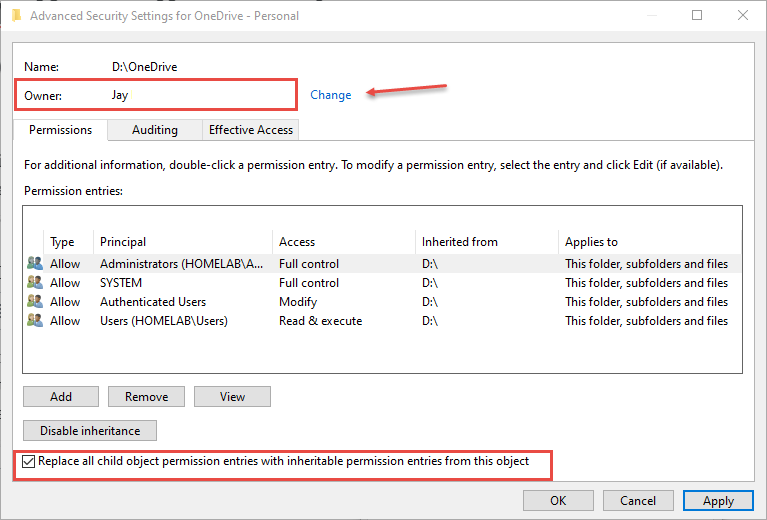
Change owner to your account and select the Replace all child object option. Double check to ensure you have everything correct and then click Apply. This will take a while based on how many files you have.




 Desktop Guy's Blog