Enabling iOS 9 Extension for Microsoft Intune in System Center 2012 R2 Configuration Manager SP1 CU1

On September 24, 2015 Microsoft announced support for iOS9 through he iOS9 extension for Microsoft Intune in Configuration Manager.

To enable the extension, go to your SCCM console (2012 R2 SP1 CU1).  Under Administration, expand Cloud Services and click Extension for Microsoft Intune.
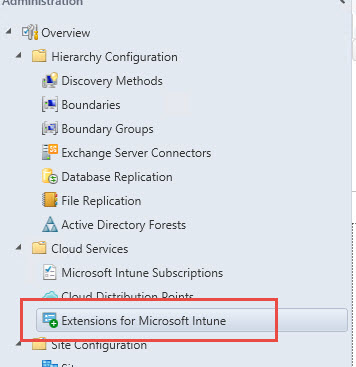
2015-10-17_11-15-47

In the right pane, right click the iOS 9 Extension and click Enable (or from the toolbar).  If you do not have CU1, this can fail.

2015-10-17_11-06-33

Accept the License Terms – make sure you read all of it first 🙂

2015-10-17_11-19-09

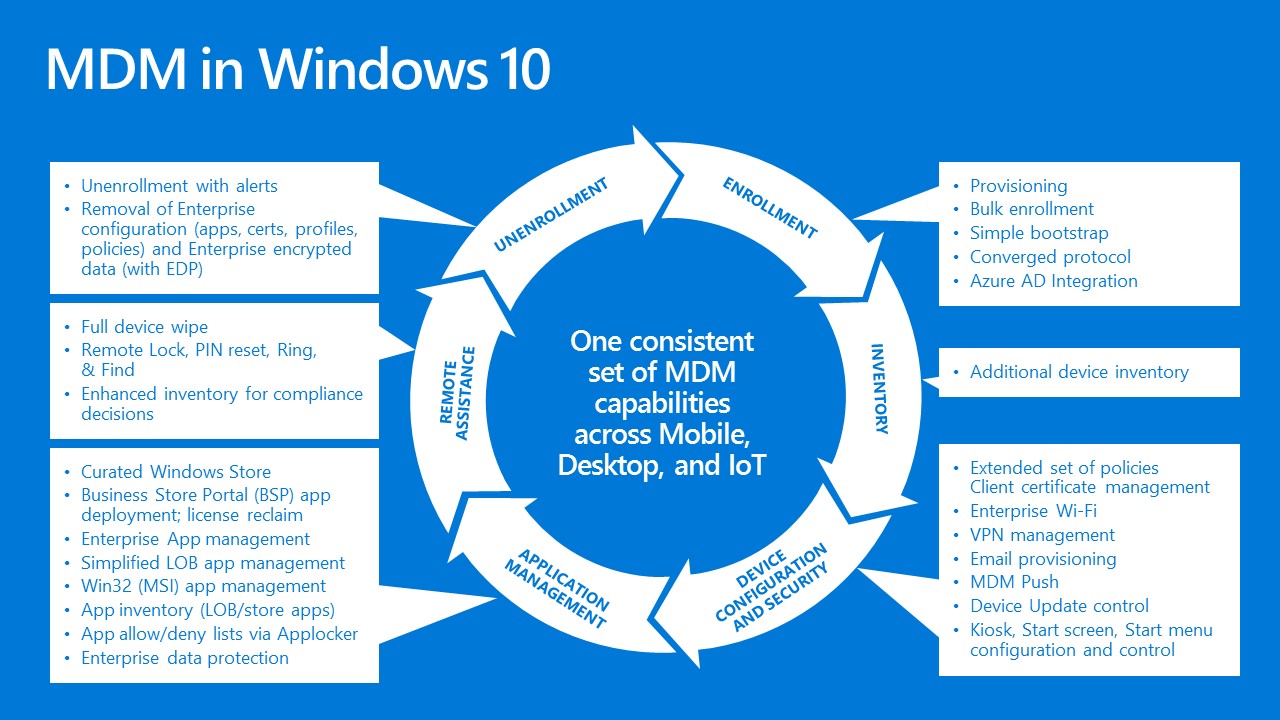
MDM in Windows 10

Built-In Mobile Device Management capabilities in Windows 10

The MDM capabilities provided in Windows covers the complete lifecycle of the device.

  • Enrollment capabilities to automate the MDM enrollment of the device as part of the Azure Active Directory join process.
  • New controls for configuring and managing the Start menu.
  • New controls over Windows updates, allowing you to control when specific Windows updates are deployed to MDM-managed devices (think “WSUS from the cloud”).
  • New AppLocker and Enterprise Data Protection configuration settings.
  • Integration with the Windows Store and the Business Store Portal (BSP) to enable automated app management.
  • Full device wipe capabilities, even for PCs.

These capabilities are supported on all types of devices, including Windows phone devices, PCs and tablets, and Internet-of-Things (IoT) devices.

MDM in Windows 10